





Managing item records.
In Koha each bibliographic record can have one or more items attached. These items are sometimes referred to as holdings. Each item includes information to the physical copy the library has.
2.5 Deleting Items
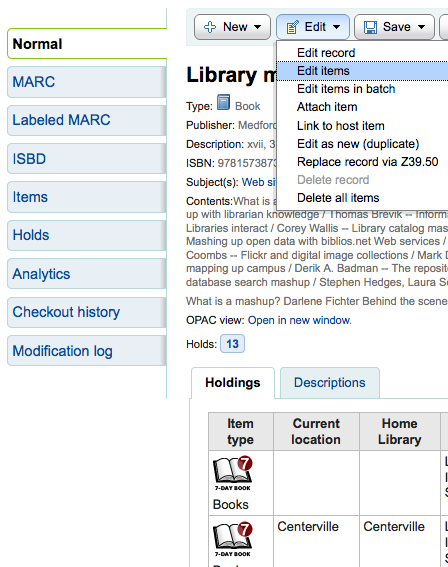
There are many ways to delete item records. If you only need to delete one item you can do this by opening up the detail page for the bib record and clicking the 'Edit' button at the top. From there you can choose to 'Edit items'.
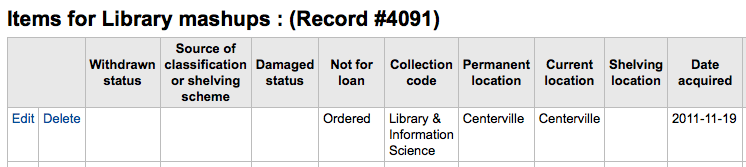
You will be presented with a list of items and next to each one will be a link labeled 'Delete'. Click that link and if the item is not checked out it will delete that item.
If you know that all of the items attached to your record are not currently checked out you can use the 'Delete all items' option under the 'Edit menu' and it will remove all items from the record.
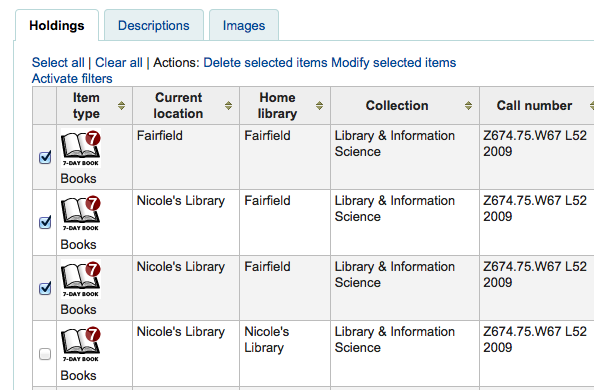
You can also enable StaffDetailItemSelection to have checkboxes appear to the left of each item on the detail display. You can then check off the items you would like to delete and click 'Delete selected items' at the top of the list.
Finally you can use the batch delete tool to delete a batch of items.